24Total
5Pending
19Completed
Design retainer.pdf
Mutual NDA.pdf
Studio proposal.pdf
Upload a PDF, drag on the signature fields, and send it. Your recipient signs in the browser and everyone gets the finished document — with a certificate that stands up on its own.
Most documents go out in under two minutes.
Choose the PDF you need signed. Nothing to convert.
Drag signature, name, date and checkbox fields onto the page.
Enter your recipient's email and send. They get a single-use link.
They sign online. Everyone receives the completed PDF with its audit trail.
Short recordings of Agreevo doing what it does — no narration needed.
Nudge chases unsigned documents. Renewals watches notice deadlines. Keeper tracks what was promised. Inbox watches the mail you told it to. Intake reads what comes in and hands it to the Reviewer, who checks it against your positions. Watch them work in one room — a trace lights up while an agent is busy, a document crosses the floor when one hands work to another — then approve what they drafted, or let Nudge send the easy ones itself.
Meet the team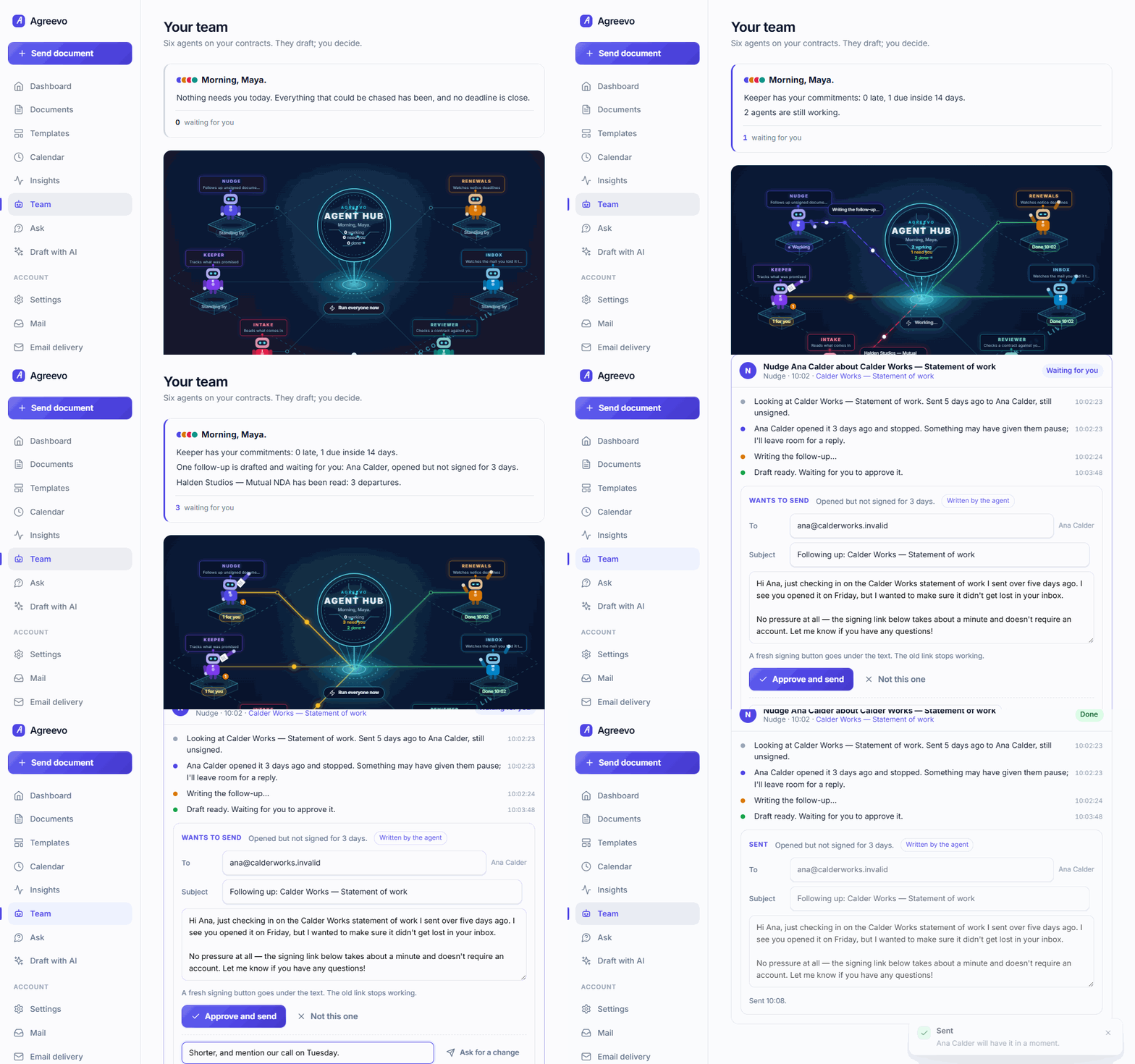
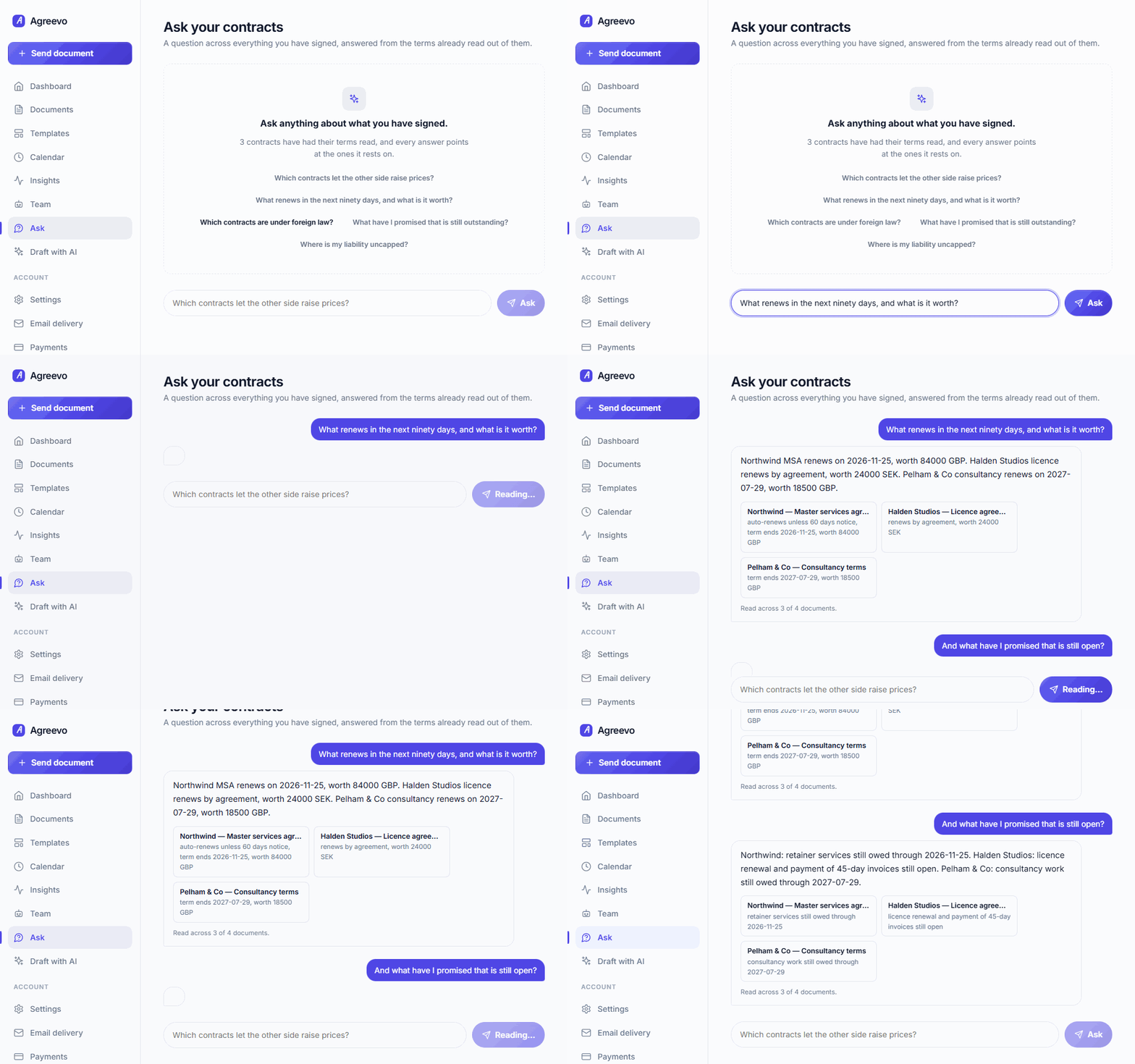
What renews this quarter and what is it worth. Where liability is uncapped. What you have promised and not done. Every answer names the contracts it rests on, so you can open them and check — and the second question is a follow-up, not a fresh search.
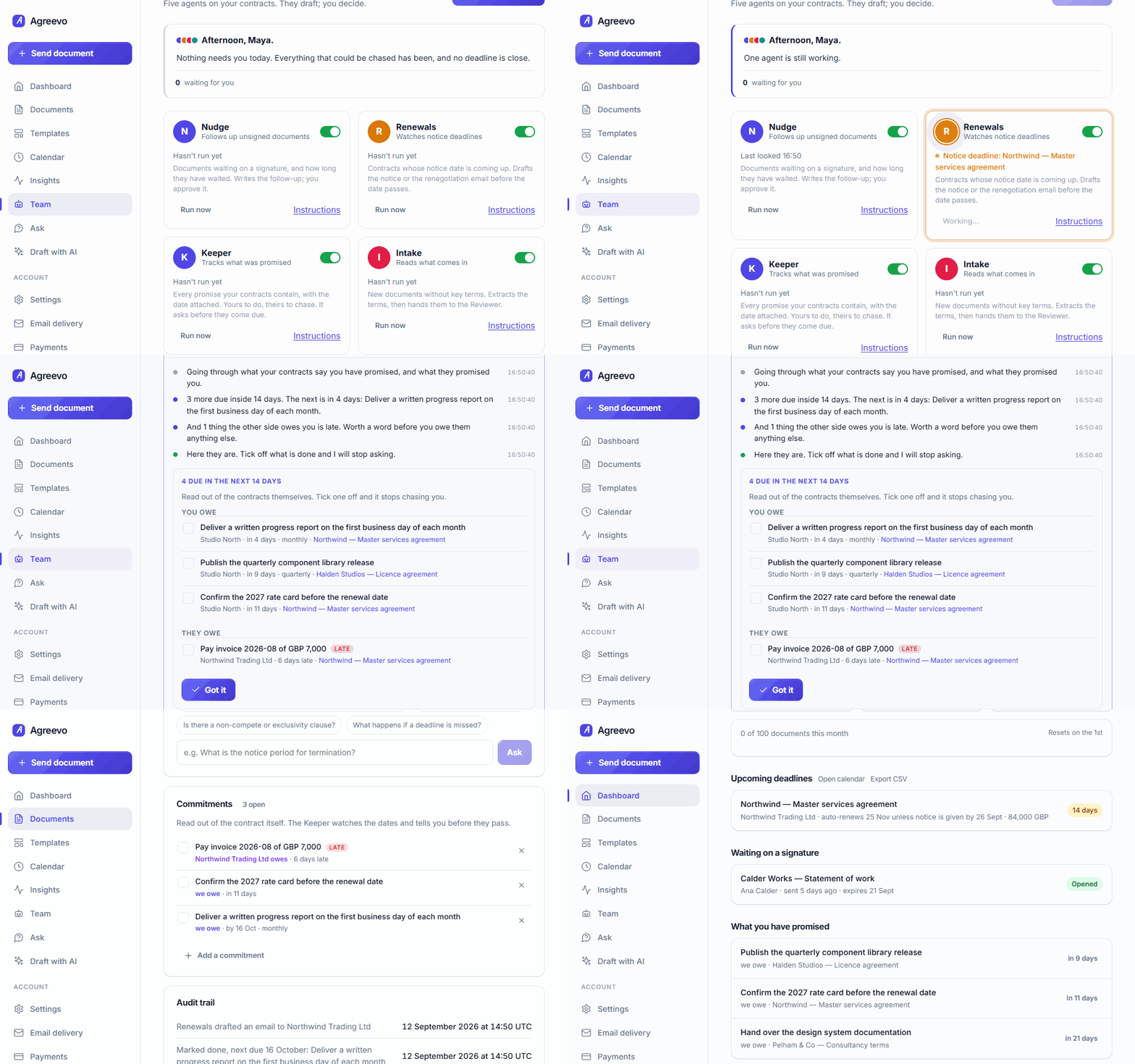
The monthly report, the annual user list, the invoice they owe you. The Keeper reads them out of the contracts themselves, tells you what falls due and what is already late, and stops asking the moment you tick it off. A monthly one comes back next month on its own.
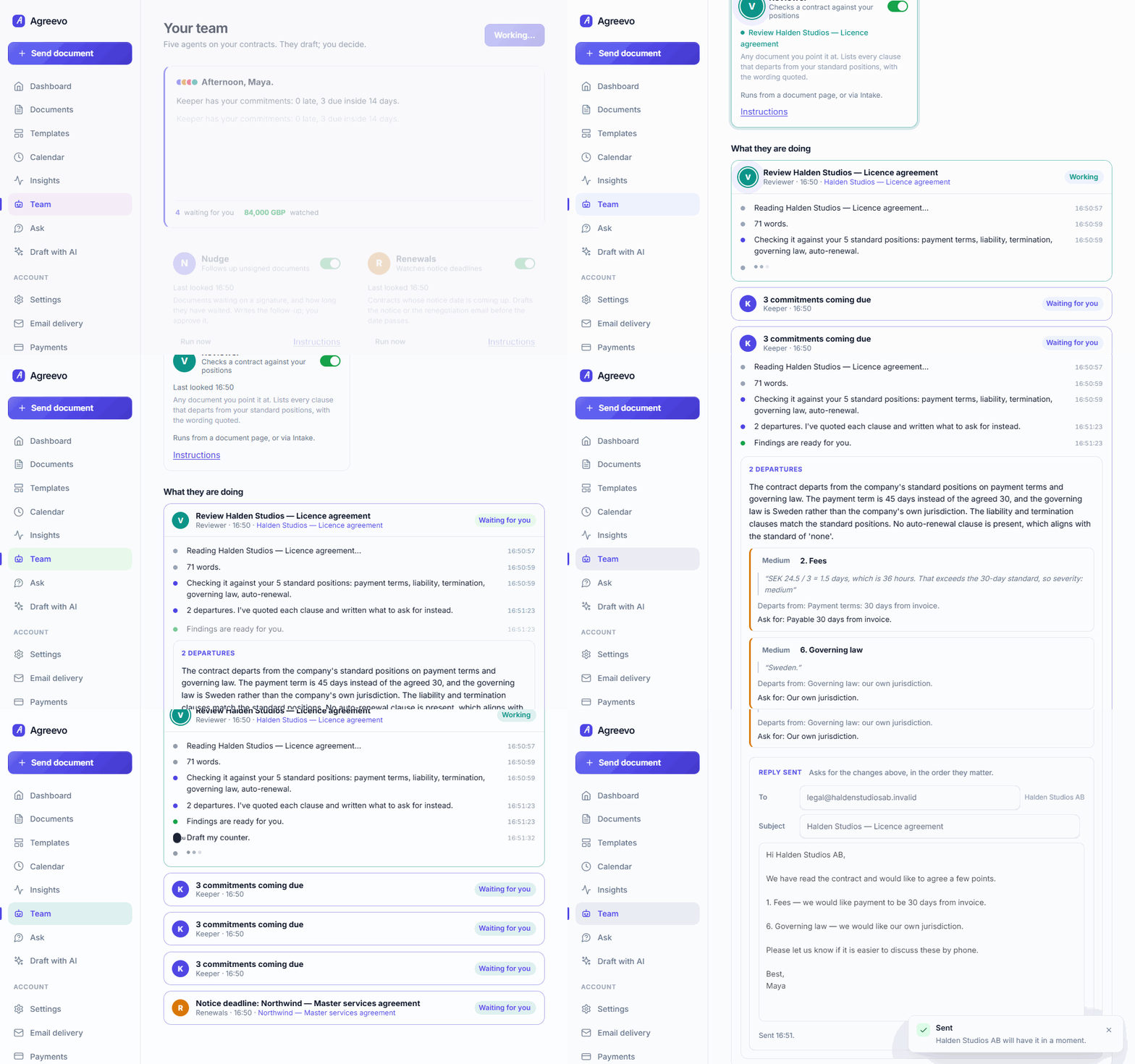
Knowing that four clauses are wrong is the easy half. The Reviewer turns its own findings into the email to the other side — your asks in their contract's language, serious ones first, in a tone that expects agreement. Edit it, then send it like any other draft.
Pick a PDF, click the fields you need onto the page, add who signs. There is nothing to set up first and nothing to learn — the whole thing is one screen.

They open the link from their email, read the document, type or draw their signature and confirm. Under a minute, on a phone or a laptop.

Paste one URL into Claude's connectors, sign in to Agreevo, click Allow. No keys, no setup. Then just ask — "send our NDA to Jane at Acme", "what needs a decision this month?"
How the Claude connector works
Claude fills your template, and the document shows up in your list with its audit trail saying so — ready to check and send, or sent already if you asked it to.

Every document has its audit trail, its key terms, and a deadline that shows up on your dashboard before it matters — so nothing renews by accident.

They work between your visits, on the documents and contracts already in your account. Nothing is sent, filed or promised until you have read it and clicked. You can watch each one think, and you can tell each one how you like things done.
Knows who opened it, when, and how many times you have asked. Writes the follow-up in your voice — and, if you let it, sends the first one itself, up to a limit you set.
Works out the last day to give notice from the contract's own terms, and drafts the notice or the renegotiation opener before it passes.
The monthly report, the annual user list, the invoice they owe you. Read out of the contracts themselves, with a date on each, and raised before it passes.
Connect Gmail or Outlook, write the rules for what counts — sender, subject, attachment — and it tells you when a contract lands. Nothing outside your rules is ever read.
Any contract that arrives without key terms gets read: counterparty, dates, renewal, value. Then it hands the paper to the Reviewer.
Payment terms, liability, termination, whatever you insist on. Every departure quoted, with the sentence to ask for instead — then the reply to the other side, written for you.
You see them think, one step at a time, and you see them hand work to each other. Under every draft is a line to type into: “shorter”, “mention our call on Tuesday”. They rewrite and come back. Every morning they tell you what happened while you were away.
They run on the same AI as the rest of Agreevo, or on your own key. Nudge and Renewals work without any AI at all, from templates, so the follow-ups never stop just because a provider did.
The signature takes two minutes. The part that costs money is the eighteen months afterwards, when nobody remembers what the notice period was and it renews on its own. Agreevo reads every contract it sends and keeps the dates for you.
Counterparty, start and end dates, renewal type, notice period, value and governing law — pulled out of the PDF and shown as fields you can correct.
A contract that renews on 19 November with 60 days' notice needs a decision by 20 September. That is the date Agreevo puts on your dashboard, not the end date.
Signing deadlines, notice dates, renewals and scheduled sends, as a feed Google, Outlook and Apple Calendar can subscribe to. One link, always current.
Signed this month, waiting on a signature, renewing within ninety days — totalled per currency, never mixed. Plus how long signing takes and where people drop out.
A contract commits both sides to things: a monthly report, a quarterly release, an invoice. Each becomes a line with a date, on your calendar and your dashboard, until it is ticked off — and a monthly one comes back next month.
“What renews this quarter?” “Where is liability uncapped?” “What have I promised that is still open?” Answered from the terms already read out of your contracts, with every answer pointing at the ones it rests on.
None of it is data entry. The terms come from the document you already sent, and you can export the lot as a spreadsheet whenever someone asks.
Start with the files you already use. Multi-page, scanned, rotated — all fine.
Signature, initials, full name, date, text and checkbox. Placed exactly where you drop them.
Each recipient gets a single-use link that dies the moment it is used. No account needed to sign.
Created, sent, opened, signed — with IP and time, bound into the final PDF as a certificate page.
Values are burned into the page, not left as editable form fields. What was signed stays signed.
Save the contracts you send every week and reuse the field layout in one click.
Every contract's notice deadline, worked out from its own terms and on your dashboard before it passes.
"What is the notice period?" answered from the document's own text, with the clause it relied on quoted back.
No complicated plans. No sales call. Start free and upgrade when you need to.
For trying Agreevo.
For people who send documents regularly.
Free to start. No card, no call, no onboarding session.
Create your account